Working with A Distributed Cache in ASP.NET Core
Introduction:
First Let us know about Cache. A cache here in asp.net core is a software component that stores data so future requests for that data can be served faster. In general terms, caching takes place where the frequently-used data is stored, so that the application can quickly access the data rather than accessing the data from the source. Caching can improve the performance and scalability of the application dramatically and can help us to remove the unnecessary requests from the external data sources for the data that changes infrequently. Asp.Net Core has a rich support for caching and supports different kinds of caching too such as Memory Caching, Distributed Caching etc. Here we are going to talk about Distributed Caching. In distributed caching, cache is not stored in to an individual web server’s memory. Cache data is centrally managed and the same data is available to all the app servers. The distributed caching has several advantages, as shown below.
- The cache is stored centrally, so all the users get the same data and data is not dependent on which web server handles its request.
- The cache data is not impacted if any problem happens with the web server; i.e., restart, new server is added, a server is removed.
The distributed cache can be configured with either Redis or SQL Server. The implementation of the caching is not dependent on the configuration; the application interacts with the cache, using IDistributedCache interface.
IDistributedCache Interface
This interface has methods, which allow us to add, remove, and retrieve the distributed cache. This interface contains synchronous and asynchronous methods.
- Get, GetAsync
It retrieves the data from the cache, using key. It returns byte[], if the key is not found in to cache. - Set, SetAsync
It adds the item to cache as byte[]. - Refresh, RefreshAsync
It refreshes the item in the cache and also resets its sliding expiration timeout, if any. - Remove, RemoveAsync
It removes the entry from the cache, using key.
We need to perform the three simple steps given below to configure distributed cache in ASP.NET Core.
- Define cache dependencies into project.json file.
- Configure cache Service ConfigureServices method of Startup class.
- Dependency is automatically injected to the application's middleware or MVC controller constructor. Using this instance of cache dependency object, we can perform the operation related to distributed cache
Distributed Cache with SQL Server
SqlServerCache allows the distributed cache to use SQL Server as cache storing purpose. Prior to using SQL Server as a cache, we must create a table with the schema given below.
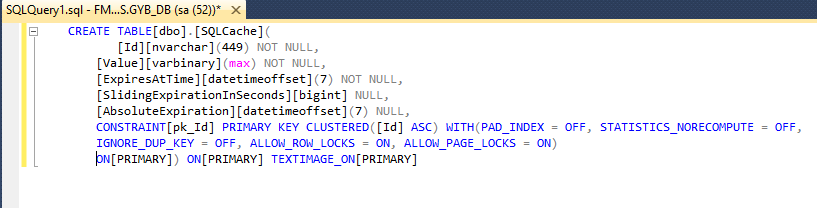
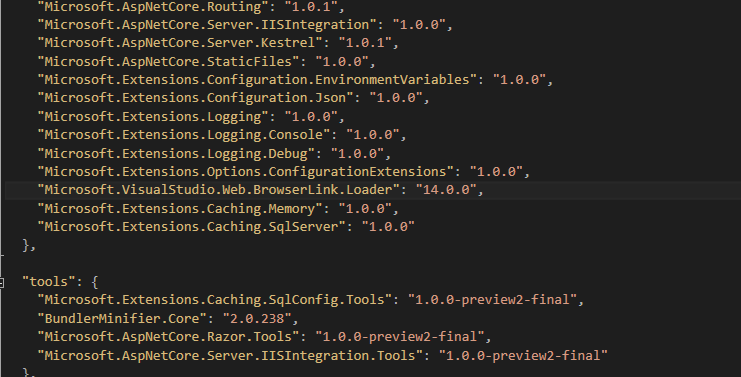
The next step is to add dependencies into the project.json file.To use SQL server as cache, we need to add "Microsoft.Extensions.Caching.SqlServer" dependency to the project.
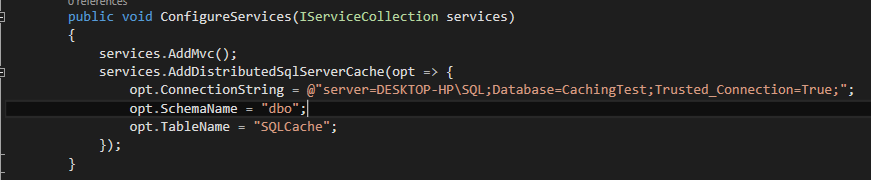
Now, we need to have some configuration in configureServices method of the startup class. Using method "AddDistributedSqlServerCache", we can configure SQL Server as cache. In this method, we need to pass the connection string, schema name and cache table name.
Using methods explained above (get, set, and remove), we can access SQL cache. SQL cache is stored in binary format, so we need to cast to byte[] before storing it in to the cache and when retrieving the data from cache, the system will return it in byte[]. To use data, we need to cast it to the required format.
In the following example, I have created methods for creating cache, retrieving cache and removing cache in controller. ASP.NET Core MVC Controller is able to request their dependencies explicitly via their constructors. We utilize the caching in our application by requesting an instance of IDistributedCache in our Controller (or middleware) constructor. In the code snippet given below, I have created controller class with three methods SetCacheData, GetCacheData and RemoveCacheData.
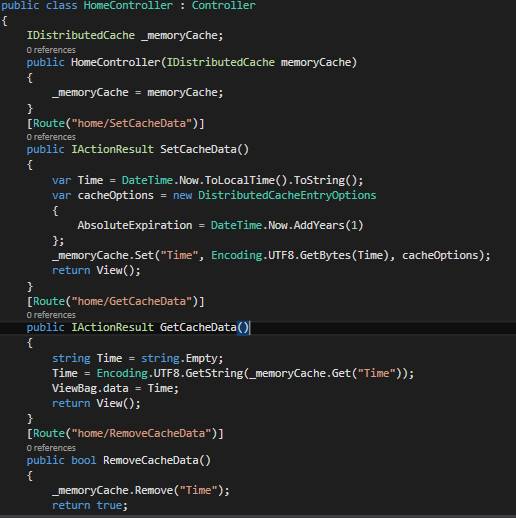
Two Errors will appear . And you can eradicate error by using namespaces Microsoft.Extensions.Caching.Distributed and System.IO.Text. Or just allocate your mouse cursor in the error and press Ctrl + ‘.’. This will show you the required namespaces.
Output of SQL table
When we call the setCacheData of the controller, it stores the data into SQL table, which is specified in the configuration. The snippet is given below, which shows how SQL Server stores the data.